Precision Mesh Offsetting with MeshLib
Mesh Offsetting is an important technique in 3D geometry processing. It creates a surface that's parallel to the original mesh at a set distance. This allows for exact growth or shrinkage of solid objects. Many industries use this process. In 3D printing, it helps ensure proper wall thickness and support structures.
MeshLib offers advanced Mesh Offset features that improve 3D modeling and manufacturing. This useful tool lets users make parallel surfaces at specific distances from the original meshes. It's crucial for industries like 3D printing, CNC machining, and injection molding. MeshInspector's Offset tool gives users great control over surface thickness. This makes work more precise and efficient in many areas.
What Mesh Offsetting modes does MeshLib offer?
MeshInspector's Offset tool has five different offset modes, each designed for specific modeling needs:
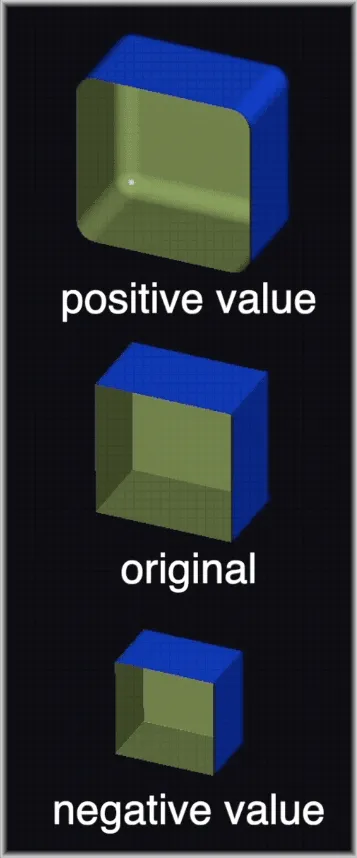
1. Entire Model Offset Mode
- Purpose: Offsets the whole mesh evenly
- Function: Positive values expand, negative values contract
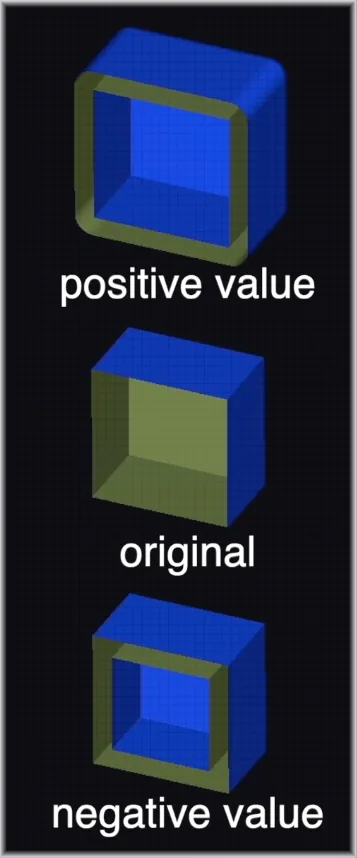
2. Thickening Mode
- Purpose: Adds an extra surface layer
- Function: Positive values add an outer layer, negative values add an inner layer
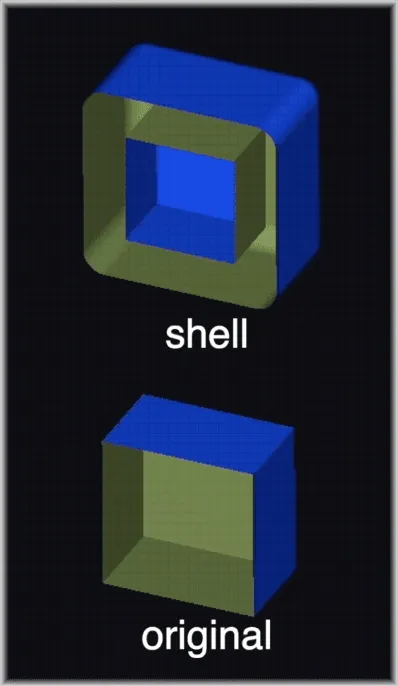
3. Shell Mode
- Purpose: Makes two new surfaces and removes the original mesh
- Ideal for: Creating hollow parts in mold making.
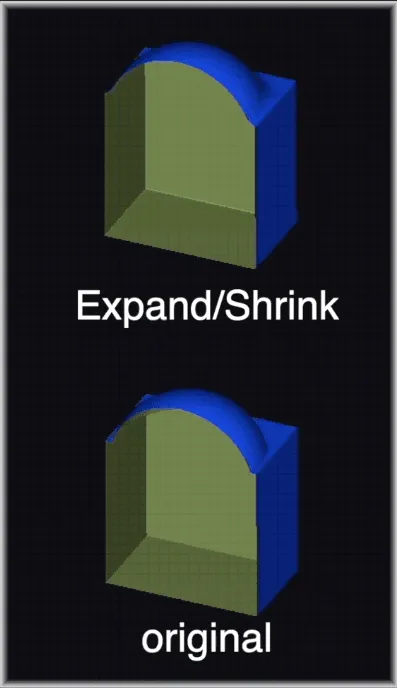
4. Expand/Shrink Mode
- Purpose: Smooths inward curves and increases volume
- Process: First expands, then shrinks the mesh.
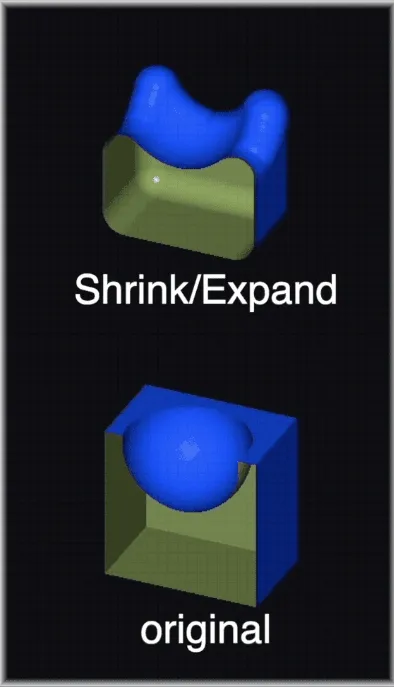
5. Shrink/Expand Mode
- Purpose: Smooths outward curves and decreases volume
- Process: First shrinks, then expands the mesh.
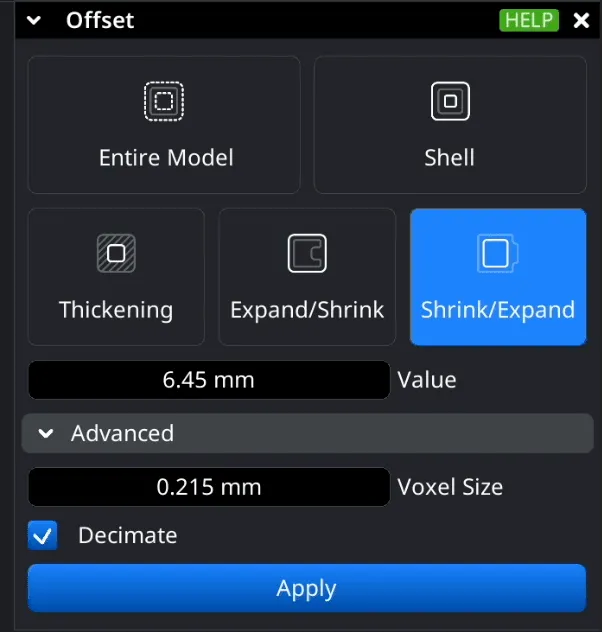
5.1 Advanced settings
Advanced settings let users fine-tune the offset process:
- Voxel Size: controls surface detail level.
- Decimation: simplifies the created surface to work better.
Here is the example of mesh offset code in MeshLib:
import meshlib.mrmeshpy as mrmeshpy

# Load mesh
mesh = mrmeshpy.loadMesh("mesh.stl")

# Setup parameters
params = mrmeshpy.OffsetParameters()
params.voxelSize = mesh.computeBoundingBox().diagonal() * 5e-3  # offset grid precision (algorithm is voxel based)
if mrmeshpy.findRightBoundary(mesh.topology).empty():
    params.signDetectionMode = mrmeshpy.SignDetectionMode.HoleWindingRule  # use if you have holes in mesh

# Make offset mesh
offset = mesh.computeBoundingBox().diagonal() * 0.05
result_mesh = mrmeshpy.offsetMesh(mesh, offset, params)

# Save result
mrmeshpy.saveMesh(result_mesh, "offsetMesh.stl")
#include <MRMesh/MRBox.h>
#include <MRMesh/MRMesh.h>
#include <MRMesh/MRMeshLoad.h>
#include <MRMesh/MRMeshSave.h>
#include <MRMesh/MROffset.h>
#include <MRMesh/MRRegionBoundary.h>
int main()
{
// Load mesh
MR::Mesh mesh = *MR::MeshLoad::fromAnySupportedFormat( "mesh.stl" );
// Setup parameters
MR::GeneralOffsetParameters params;
params.voxelSize = mesh.computeBoundingBox().diagonal() * 5e-3f; // offset grid precision (algorithm is voxel based)
if ( !MR::findRightBoundary( mesh.topology ).empty() )
params.signDetectionMode = MR::SignDetectionMode::HoleWindingRule; // use if you have holes in mesh
// Make offset mesh
float offset = mesh.computeBoundingBox().diagonal() * 0.05f;
auto meshRes = MR::generalOffsetMesh( mesh, offset, params );
if ( !meshRes.has_value() )
{
// log meshRes.error()
return 1;
}
// Save result
MR::MeshSave::toAnySupportedFormat( *meshRes, "mesh_offset.stl" );
return 0;
}Find more examples in our documentation.
Industries benefiting from using MeshLib's Mesh Offset
MeshLib's Mesh Offset features offer numerous advantages in many fields:
3D Printing
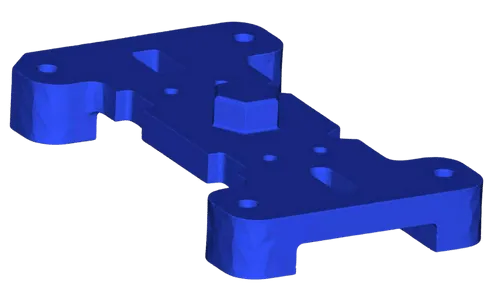
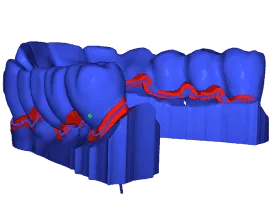
In 3D printing, Mesh Offset allows exact control of wall thickness, better support structures, and improved print quality.
Dental Industry
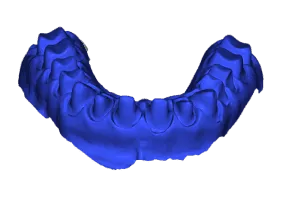
Dentists use Mesh Offset to design custom aligners and dental devices, ensuring they fit well and feel comfortable.
Why choose MeshLib SDK for Mesh Offsetting?
MeshLib leads in 3D processing, offering top-notch Mesh Offsetting that's fast, precise, and versatile. It's an open-source 3D geometry library that works with C++, C, C#, Python, and JavaScript, fitting easily into different projects and speeding up development. Its advanced methods and GPU boost make offsetting up to 10 times faster than other options, giving high-quality results even for complex meshes.
MeshLib works on different platforms and has a modern design without old limitations. This makes it the top choice for professionals who want to push the limits of 3D modeling and manufacturing in fields like 3D printing, CNC machining, and medical device design.
Conclusion
MeshLib's Mesh Offset features help professionals in many industries achieve new levels of precision and efficiency in their 3D modeling and manufacturing work. Using MeshInspector's Offset tool, users can confidently tackle complex geometric challenges and produce better results.
Unlock the full potential of Mesh Offsetting with MeshInspector through in-depth tutorials and demonstrations on our YouTube channel. Watch how MeshLib's powerful tools can transform your 3D modeling and manufacturing processes.
What our customers say
Massimo Ivani
CEO, Medialab

Read full review«Our application is a medical device, so we have to be able to trust the SDK behind it. We built a lot of internal tests before switching, and MeshLib gave us the precision we had before at twice the speed…»
Ruedger Rubbert
Chief Technology Officer, Brius Technologies Inc

Read full reviewWith MeshInspector MeshLib we were able to automate many of our workflow processes, thanks to its advanced, modern, and efficient dental and geometry oriented algorithms, covering many of our orthodontic-related tasks: CT and intraoral scan segmentation, voxel and Boolean operations, editing, aligning, visualization, inspection, and import/export of mesh objects. We use the versatile MeshInspector MeshLib API, both in production and R&D for fast prototyping and testing of our ideas.
Mariusz Hermansdorfer
Head of Computational Design at Henning Larsen Architechts

Read full reviewOver the past year, MeshLib has transformed my approach to design and analysis in landscape architecture and architecture projects. This powerful library excels in critical areas, such as geometry processing, interactive booleans, point cloud manipulation, and curve offsetting. These features enhance design workflows, allowing for dynamic modifications, efficient terrain modeling, stormwater flow analysis, and advanced wind flow visualiiza…
Gal Cohen
CTO, customed.ai

Read full reviewMeshLib has been a game-changer for our company, providing all the essential operations we need to handle meshes and create highly accurate personal surgical instruments (PSIs), which are our primary products. After extensive research and comparison, MeshLib stands out as the best solution on the market. Their team is exceptionally professional and knowledgeable. Collaborating with them has been an absolute pleasure—they respond to any issues we encounter promptly and always deliver effective solutions. Their commitment to customer support and technical excellence is truly unmatched.
HeonJae Cho, DDS, MSD, PhD
Chief Executive Officer, 3DONS INC

Read full reviewMeshLib SDK helped us achieve faster and more accurate calculation results and outperformed any other Mesh Processing library that we evaluated. For us in digital dentistry, it was a game-changer. Mesh processing operations, such as inspecting and editing the mesh to create dental devices for the treatment plan, are crucial. MeshInspector support liberated our team from technical constraints so we concentrated on creating exactly what we wanted. I highly recommend incorporating the MeshLib into your software arsenal.
Thomas Tong
Founder, Polyga

Read full reviewWhen we set out to develop our new PointKit scanning platform, we chose MeshInspector’s MeshLib as the foundation. That partnership let us accelerate development, ship new features faster, and get to market months sooner than we could have on our own. The MeshInspector team has been outstanding — quick answers, deep technical know-how, and genuine enthusiasm for our success. We simply wouldn’t be where we are today without their support.
Join companies switching to next-gen geometry algorithms.
















Try MeshLib now
Booleans, mesh repair, decimation and ICP — in your browser, as JavaScript and WebAssembly. No install, no sign-up.
Open live demoOr install the SDK — free to evaluate